

You have just downloaded a great movie on the official Amazon Prime Video app and want to transfer it to a USB drive, watch it on VLC media player, or simply free up some space on your C: drive. But when you open your file explorer, you hit a frustrating roadblock: Where are Amazon Prime Video downloads stored?
By default, Amazon hides these downloaded files deep within your system folders. In this 2026 updated guide, we will show you the exact download location on your PC, Mac, and Android. More importantly, we will reveal why finding these files won't actually let you play them anywhere else—and how to fix that problem permanently.
Relate Article: Where is Amazon Music Stored?

Quick Answer: The Amazon Prime Video Download Location (Windows 10/11)
If you are using the official Prime Video app for Windows 10 or Windows 11, Amazon stores your downloaded videos in a deeply hidden AppData folder. Here is the exact path:
C:\Users\[YourUsername]\AppData\Local\Packages\AmazonVideo.PrimeVideo_pwbj9vbatpz2a\LocalState\Downloads
Note: Because the AppData folder is hidden by default in Windows, you cannot just click through to find it. You must first open File Explorer, click the "View" tab at the top, and check the box for "Hidden items".
The following will show you where are Amazon Video downloads stored on Windows PC with details.
Step 1 Hit "Windows + E" on your keyboard to open the File Explorer.
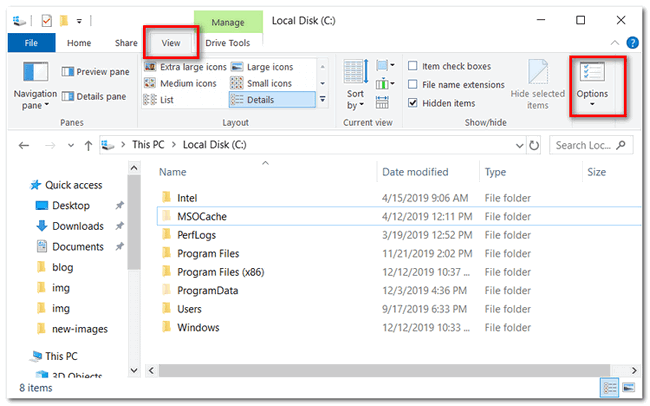
Step 2 By default, the folder Amazon Video is hidden, so you will need to change this setting. Go to the "View" tab and click the "Option" tab at the upper right.
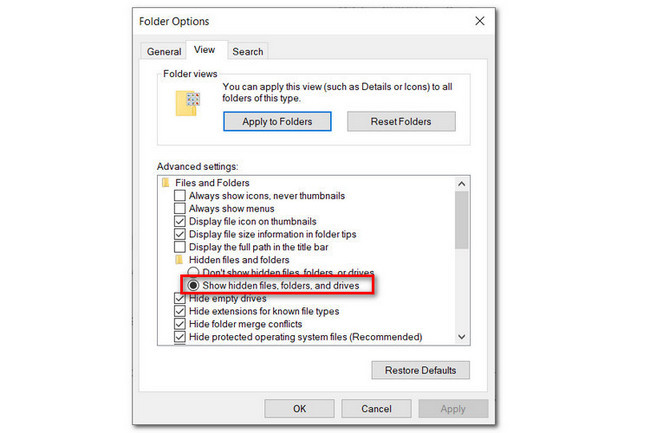
Step 3 In the pop-up Folder Options window, select the "View" tab and scroll to "Files and Folders" settings, check the option of "Show hidden files, folders, and drives", then click "OK" to save changes.
Step 4 On the File Explorer, you can access the Amazon Video download folder by navigating to C:\Users\UserName\AppData\Local\Packages\AmazonVideo.PrimeVideo_pwbj9vvecjh7j\
LocalState\Downloads.
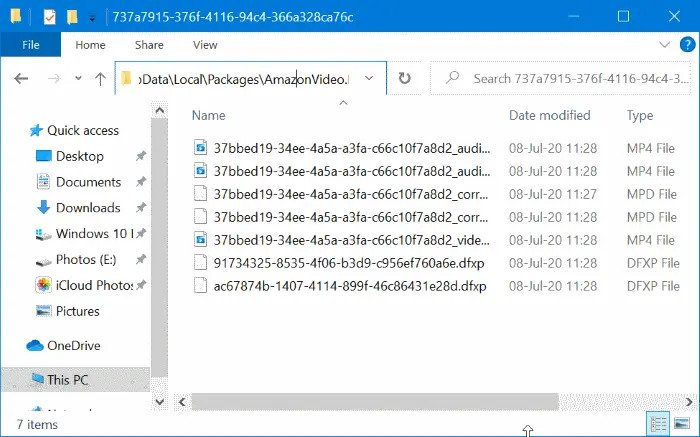
Note: Here "C" is the local disk where you've installed Prime Video app, and "UserName" is your PC account username.
Where Are Prime Video Downloads Stored on Mac & Android?
For Mac Users:
If you are using the official Prime Video app from the Mac App Store, your downloads are sandboxed to prevent copying. You can usually find the cached data here:
/Users/[YourUsername]/Library/Containers/com.amazon.aiv.AIVApp/Data/Library/Application Support/Amazon Video/
For Android Users:
On Android devices, where does Amazon Prime save downloads? If you download to internal storage, they are hidden in a system root folder: /data/data/com.amazon.avod.thirdpartyclient/. If you set it to download to an SD card, look for a hidden folder at: Android/data/com.amazon.avod.thirdpartyclient/files/. You will need a third-party File Manager app with "Show Hidden Files" enabled to see them.
You can always download Amazon videos for offline playback on Android devices. Following is the location of the Amazon Video downloads folder on Android.
Step 1 Open the File Manager on your Android phone or tablet.
Step 2 Find out the Prime Video download folder by navigating to "/data/data/com.amazon.avod.thirdpartyclient" or "internal storage/android/data/ com.amazon.avod.thirdpartyclient".
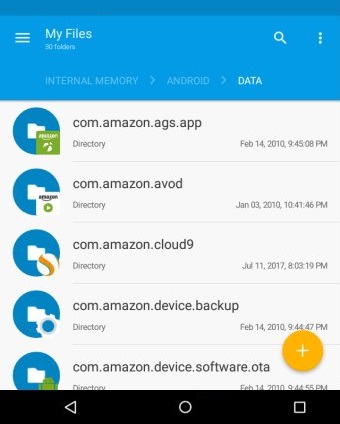
Now, you've got the download folder of Prime videos. As you can see, your downloaded Amazon videos are made in "MP4 Video File" format and with "DXFP File" and "MPD File". However, all these files don't work or play on other media player or device, except the Prime Video app. So even if you've found out downloaded Amazon video files, you can not copy them to other portable devices.
The Bad News: Why You Can't Play or Move These Files
Finding the Amazon Prime Video download location pc folder feels like a victory, but it quickly turns into a disappointment. If you open that folder, you won't see an MP4 file named "The_Boys_S01E01.mp4". Instead, you will see a mess of unknown folders and fragmented files with random numbers.
This is because of DRM (Digital Rights Management) protection. Amazon encrypts its downloaded files so they can only be read by the official Prime Video app. Because of this:
- You cannot play downloaded Amazon Prime videos on VLC, Windows Media Player, or QuickTime.
- You cannot copy these files to a USB flash drive or cast them to a smart TV.
- The files will automatically expire and become unplayable after 48 hours of offline viewing.
The Ultimate Solution: How to Save Prime Videos as Playable MP4s
If you want to actually own your downloads, choose exactly where they are stored, and play them on any device without DRM restrictions, you need to ditch the official app's download feature and use a professional tool. Fortunately, there's still a shortcut to play Amazon videos on other media players or transfer them to any devices for watching -- download Prime videos as commonly used MP4 files. What we talk about the "MP4" format here is an open video format, far different from the "MP4 Video File" format. It's exactly the video format you usually use in daily life.
To save Prime movies or TV shows as MP4, you are required to use a video tool, TuneBoto Amazon Video Downloader. It's a powerful and smart project, especially design to download any Amazon videos to MP4 or MKV format with HD (up to 1080P) video quality kept. Meanwhile, you can also select multi-language audio and subtitle track for downloading. Read on and we will show you how TuneBoto works.
You may also be interested: Convert Amazon Music to MP3 | Play Amazon Music on Apple Watch
Amazon Video Downloader
-
Download Prime Video to PC/Mac as standard MP4 or MKV files.

-
Choose exactly where your Amazon Video downloads are stored.
-
Keep multi-language audio tracks and subtitles (up to 1080P).
-
Play downloaded videos on VLC, USB drives, TVs, or smartphones.
-
Bypass the 48-hour expiration limit—keep your movies forever.
Step-by-Step: How to Download Prime Video to Any Folder You Want
Step 1 Open TuneBoto and Sign in to Prime Video Account
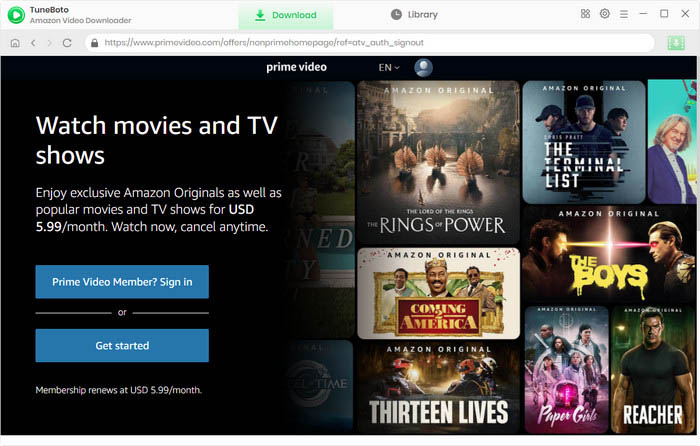
Run TuneBoto Amazon Video Downloader on Windows or Mac computer and log in to your Prime Video account. Open the Amazon Video login window by clicking "Sign In" button.
Note: TuneBoto needs to work with an Amazon Video account. But don't worry, it will not take any other information from your account than the videos.
Step 2 Select Output Settings
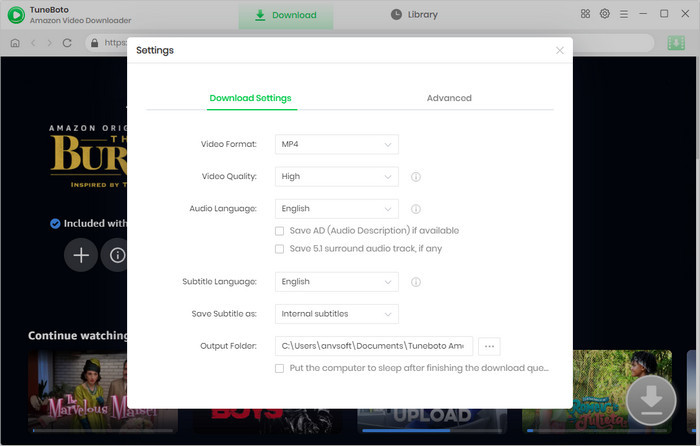
Click the "Setting" button on the upper right corner to customize the Output Quality (High, Medium, Low), Audio & Subtitle, Output Path, etc.
Step 3 Search Amazon Titles on TuneBoto
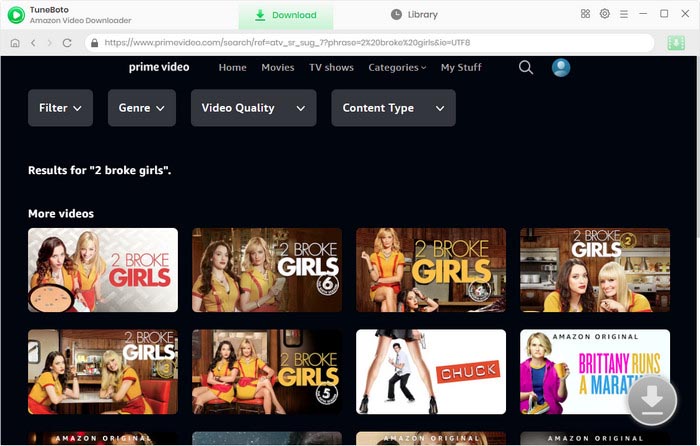
Import Prime videos to TuneBoto by entering the name of movies & TV shows, and then simply press the "Enter" button on your keyboard. After seconds, you will find that the related Prime videos are listed.
Step 4 Customize Output Settings
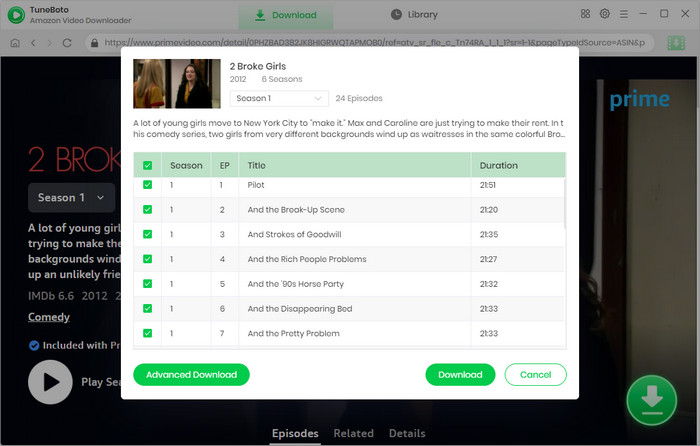
Next, you can open the Advanced Download window to select specific audio tracks, video quality, and subtitles. For TV shows, directly click on the green Download icon to choose the episodes you want to download, and click "Advanced Download" to access the window. For films, please hit the Download icon directly to open the according window.
Step 5 Start to Download Amazon Video to HD MP4
Finally, please click the "Download" icon, the program will start downloading the Amazon videos to computer as MP4 files quickly.
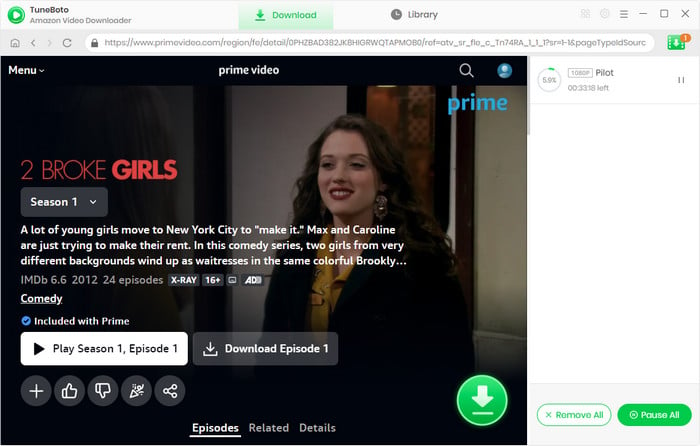
Once the downloading process is over, click the "Library" tab on the top and you'll see all MP4-Format Prime videos listed. Click the "Folder" icon next to each title and you'll be directed to the output folder on your local computer right away.
Frequently Asked Questions (FAQ)
Q: Can I change the official Amazon Prime video download location?
A: Yes, in the official Windows 10/11 app, you can change the download drive (e.g., from C: to D:). Go to the app's Settings > "Download to" and select a different drive. However, the files will still be hidden and encrypted with DRM, meaning you cannot play them outside the official app.
Q: How do I put an Amazon Prime movie on a USB flash drive?
A: You cannot transfer movies downloaded via the official Prime Video app to a USB drive because they are encrypted. To do this, you must use TuneBoto Amazon Video Downloader to save the movies as MP4 files, which you can then easily drag and drop onto any USB flash drive.
Q: Are downloaded Amazon Prime videos MP4?
A: No. Videos downloaded using the official Amazon Prime Video app are saved in an encrypted, proprietary format. To get standard MP4 files, you must use a third-party tool like TuneBoto.
Conclusion
While finding exactly where Amazon Prime video downloads are stored on your PC or Mac is possible, the strict DRM encryption makes those files useless for anything other than viewing within the official app for a limited time. If you want true freedom to watch your downloaded Prime videos offline, on any device, and without expiration dates, TuneBoto Amazon Video Downloader is the ultimate, must-have tool. Try it today and finally take control of your media library!
Note: Only the first 5 minutes of each video can be downloaded with the trial version, please purchase a license to enjoy the full video. It is suggested that to download the trial version and have a test before purchasing it.