

Planning a trip or struggling with a poor internet connection? You might be wondering how to download Prime Video to PC for seamless offline viewing. While Amazon offers an official app for Windows, many users are frustrated to discover its hidden limits: downloaded movies are heavily encrypted, locked within the app, and automatically expire after 48 hours.
If you want to bypass these strict DRM rules and save your favorite shows permanently as standard MP4 files on your local computer storage, you need a smarter solution. Whether you are using a Windows 10/11 PC or a Mac computer, here is the complete 2026 guide to doing it right.
- Method 1: Download Prime Video via the Official Windows App
- Steps to Download Videos in the Official App
- The Hidden Limits of the Official App (DRM & 48-Hour Expiration)
- Method 2: Download Prime Video to PC Permanently as MP4 (Recommended)
- Why TuneBoto is the Best Alternative for PC Users
- 4 Steps to Save Prime Movies to Local Computer Storage
- Official App vs. TuneBoto: Which is Better for PC?
- Frequently Asked Questions (FAQs)
Method 1: Download Prime Video via the Official Windows App
If you only need to watch a movie quickly and don't mind the restrictions, Amazon provides an official Prime Video app for Windows 10 and Windows 11 users. (Note: There is currently no official Prime Video app for Mac computers that supports offline downloading.)
What You Need to Download Prime Video:
- A stable internet connection, and
- An Amazon Prime or Prime Video account, and
- A mobile or tablet running Android, iOS, Fire system or
- A laptop or computer running Windows 10 version 17763.0 or higher, with both x86 and ARM versions of Microsoft's system, and
- The latest version of Amazon Prime Video iOS, Android, Fire, Windows 10 app.
For Mac users, please check How to Download Amazon Prime Video to Mac
Steps to Download Videos in the Official App
Step 1. Download Prime Video from Microsoft Store, then launch it on Windows 10 PC or laptop.
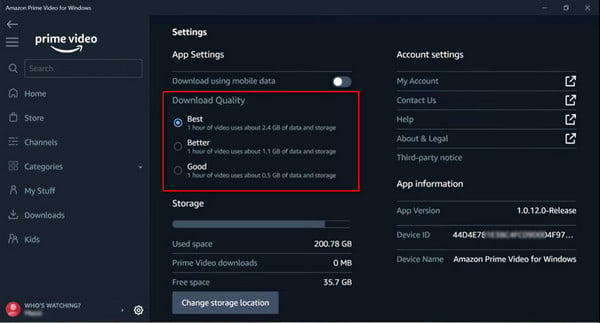
Step 2. Log in to your Prime Video account. Then go to "Setting", here you could select the video quality of "Best, Better, or Good".
Step 3. Choose a Prime movie or TV show, click it to go into the detail page, and click "Download".
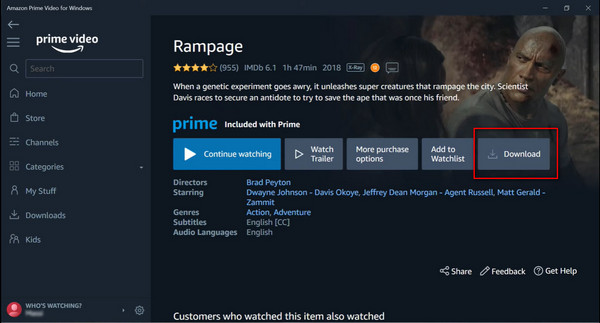
Once finished, access your videos by clicking the Downloads tab on the left menu.
⚠️ The Hidden Limits of the Official App (DRM & 48-Hour Expiration)
While the official app is free to use, it comes with severe restrictions designed to protect copyright:
- Encrypted Files: The app saves videos in a deeply hidden download folder on your C: drive. The files are in a proprietary format, meaning you cannot play them on VLC, QuickTime, or any other media player.
- Viewing Limits: You typically have 30 days to begin watching a downloaded video. Once you press play, you only have 48 hours to finish it before it expires and requires an internet connection to re-verify.
- Device Restrictions: You cannot transfer these downloaded files to a USB drive, an external hard drive, or a smart TV.
Method 2: Download Prime Video to PC Permanently as MP4 (Recommended)
If you want true ownership of your downloads, you need a professional tool. TuneBoto Amazon Video Downloader is the ultimate solution for PC and Mac users. It legally accesses your Prime Video library and records the video stream, allowing you to download Prime movies directly to your local computer storage in plain MP4 or MKV format.
You may also be interested: Download Amazon Music to Computer | Amazon Music to MP3
Amazon Video Downloader
-
Download Amazon Prime Video in HD quality

-
Support downloading Prime video to MP4/MKV
-
Keep audio tracks and subtitles
-
Download videos in batch at a fast speed
-
Free upgrade and technical support
4 Steps to Save Prime Movies to Local Computer Storage
Next, we will introduce how to use TuneBoto Amazon Video Downloader, on Windows 7/8/10/11 computer, to download Prime movies or TV shows truly offline. After that, you can move them to other devices with ease.
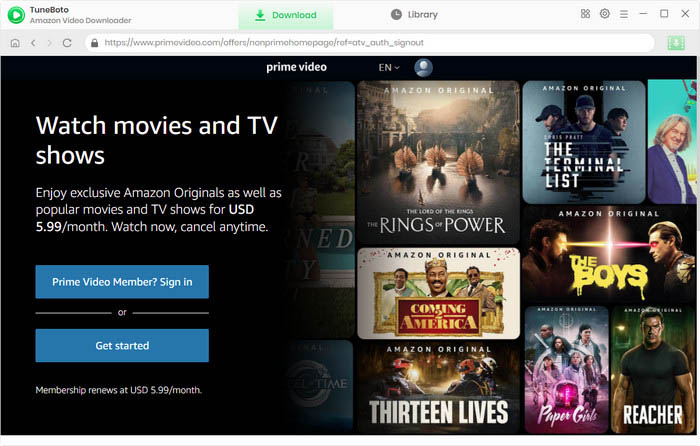
Step 1 Run TuneBoto Amazon Video Downloader
Download and launch TuneBoto Amazon Video Downloader, then please select the region of your Amazon account.
- For the United States, select "amazon.com"
- For Germany, select "amazon.de"
- For Japan, select "amazon.co.jp"
- For United Kingdom, select "amazon.co.uk"
- For France, India, Canada, and others, select "primevideo.com"
Please log into your Amazon Prime / Prime Video account by clicking Sign In.
Note: TuneBoto needs to work with an Amazon Video account. But don't worry, it will not take any other information from your account than the videos.
Step 2 Choose Prime Video Output Format
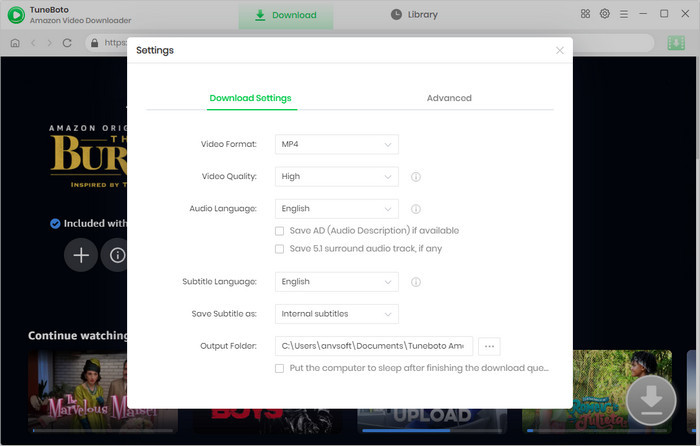
Tap on the "Setting" gear icon at the upper-right corner, a window pop-up will let you change output settings.
- Video format: MP4 or MKV
- Video quality: High, Medium or Low
- Video codec in Advanced Tab: H.264 or H.265
- Subtitle Mode: External Subtitles, Internal Subtitles and Hardcode Subtitle. (Select Hardcode subtitles, and then you can save subtitles in SRT format.
- Audio language: English, French, German, Japanese, Spanish, Chinese and more
- Subtitle language: English, French, German, Japanese, Spanish, Chinese and more
Step 3 Search Amazon Prime Video
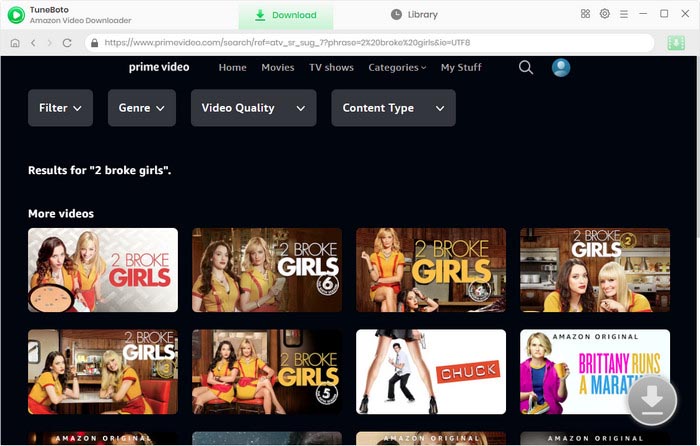
Using TuneBoto Amazon Video Downloader is as same as Amazon Prime. To search, click the magnifying glass symbol in the upper right corner. Now please enter the video's name in the search bar and then press the "Enter" button on the keyboard.
Step 4 Choose Video Track, Audio Track and Subtitle track
Select the video's thumbnail to access its details page, where the download button in the lower right corner will become active and change color from gray to green.
TuneBoto offers video and audio tracks in different bitrates and sizes for your storage, and you can choose subtitle tracks in different languages. Just click the Download icon then the Advanced Download icon to access the Advanced Download window when you are trying to download the series. For downloading movies, please click the green download icon to open the window.
The higher the bitrate, the higher the quality. The format of most audio tracks is AAC. You can also download 5.1 audio by checking the option of audio tracks with 5.1 tags.
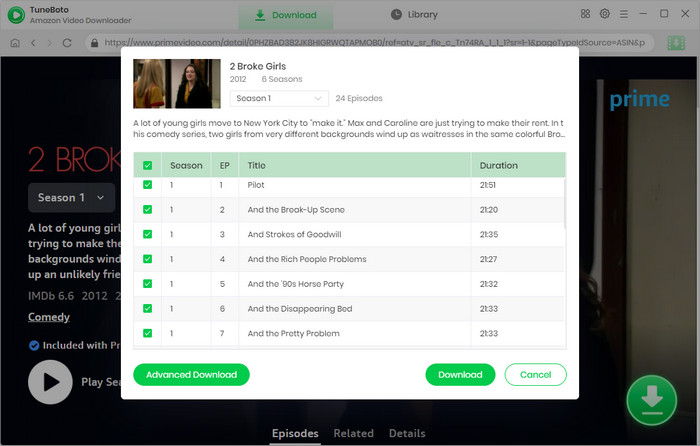
Step 5 Choose Amazon Prime Movie or TV Show to Download
Now, all you need to do is clicking the download button, and waiting for some time.
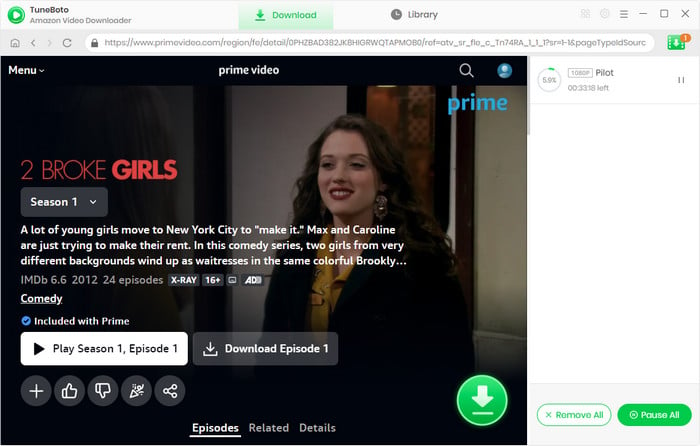
After the download process finishes, you can access the downloaded title by directly going to the output path you've set previously. Or click the "Library", then "Folder" icon beside each video, then you will be directed to the regarding videos.
Official App vs. TuneBoto: Which is Better for PC?
While the official Prime Video app is free, it restricts your ownership of the media. TuneBoto, on the other hand, gives you complete control. Because downloaded files are saved as universal MP4/MKV formats, they never expire. You can play them on any media player, and easily transfer them to a USB drive or external hard drive.
| Features | Official Prime Video App | TuneBoto Downloader |
|---|---|---|
| Supported OS | Windows 10/11 only (No Mac app) | Windows 7/8/10/11 & macOS |
| File Format | Encrypted App Cache | Standard MP4 / MKV |
| Offline Expiration | Expires after 48 hours / 30 days | Permanent (Never Expires) |
| Device Transfer | Locked to the original PC | Transferable to USB, TV, Mobile |
Frequently Asked Questions (FAQs)
Q1: Can I download Prime movies to my laptop permanently?
Yes. While the official Amazon Prime app deletes downloaded movies after 48 hours of viewing, you can use a tool like TuneBoto Amazon Video Downloader to convert and save Prime videos as permanent MP4 files directly to your laptop's local drive.
Q2: Where does the Amazon Prime Video app store downloaded movies on PC?
By default, the official Prime Video app for Windows 10/11 hides downloaded files in a deeply buried, hidden folder on your C: drive. Furthermore, these files are encrypted in a proprietary format, meaning they cannot be copied, moved, or played outside the official app.
Q3: How do I watch Amazon Prime offline on a Mac?
Amazon does not offer an official Prime Video app for Mac computers. To watch offline on macOS, you must use a third-party downloader like TuneBoto to download the videos as MP4 files, which can then be played offline using QuickTime or VLC media player.
Conclusion
If you just need a quick download for a short flight and own a Windows 10/11 PC, the official Prime Video app works fine. However, if you want to avoid the frustrating 48-hour expiration limits, watch movies on your Mac, or build a personal offline library on an external drive, TuneBoto Amazon Video Downloader is the absolute best way to download Prime Video to PC. Download the free trial today and take control of your offline viewing experience!
Note: Only the first 5 minutes of each video can be downloaded with the trial version, please purchase a license to enjoy the full video. It is suggested that to download the trial version and have a test before purchasing it.